Guide to Editing Personal Information
I. Access the Personal Information Page
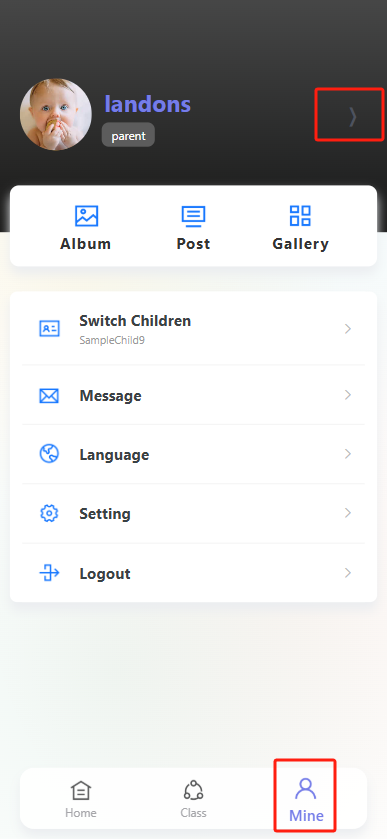
Open theProgressive Web App and tap the "Profile" icon (far right in the bottom navigation bar) to enter your personal profile page. On the profile page, tap the arrow icon next to your avatar to open the "Personal Information" page.
II. Edit Personal Information Fields
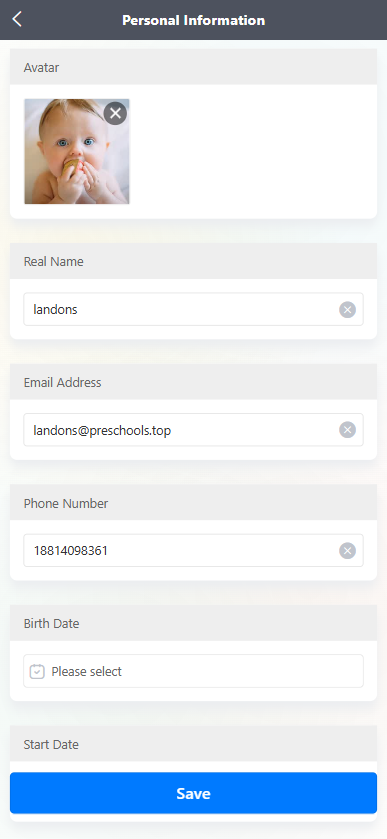
In the "Personal Information" page, you can edit the following information:
-
Avatar: Click on the avatar area to change the avatar (to remove the current avatar, click the "×" in the upper right corner of the avatar).
-
Real Name: Enter or modify the name in the name input box, click the "×" on the right side of the input box to clear the existing content.
-
Email Address: Enter or modify the email in the email input box, click the "×" on the right side of the input box to clear the existing content.
-
Phone Number: Enter or modify the phone number in the phone number input box, click the "×" on the right side of the input box to clear the existing content.
-
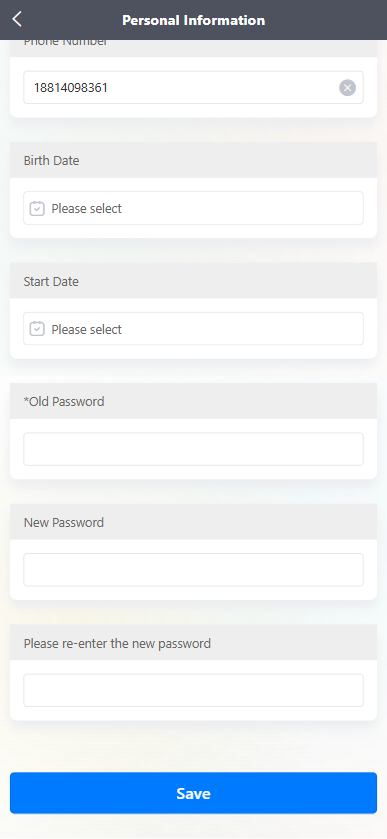
Birth Date: Click the "Please select" input box to select the birth date.
-
Start Date: Click the "Please select" input box to select the relevant start date.
-
Password Change: Enter the original password in the "*Old Password" input box, set a new password in the "New Password" input box, and then re-enter the new password in the "Please re-enter the new password" input box to complete the password change operation.
III. Save Your Changes
After updating all desired information, tap the blue "Save" button at the bottom of the page to confirm and save your edits.